Super Trend
Super Trend Indicator – Complete Guide
Overview
The Super Trend Indicator is one of the most popular trend-following indicators used in technical analysis. It helps traders determine the current market trend, identify potential trend reversals, and generate high-quality trading signals with minimal chart clutter.
Unlike traditional moving averages that often lag behind price action, the Super Trend Indicator dynamically adjusts to market volatility, allowing traders to react more quickly to changing market conditions.
The indicator is suitable for day trading, swing trading, scalping, and long-term investing across Forex, CFDs, Stocks, Commodities, Indices, Futures, and Cryptocurrency markets.
How the Super Trend Indicator Works
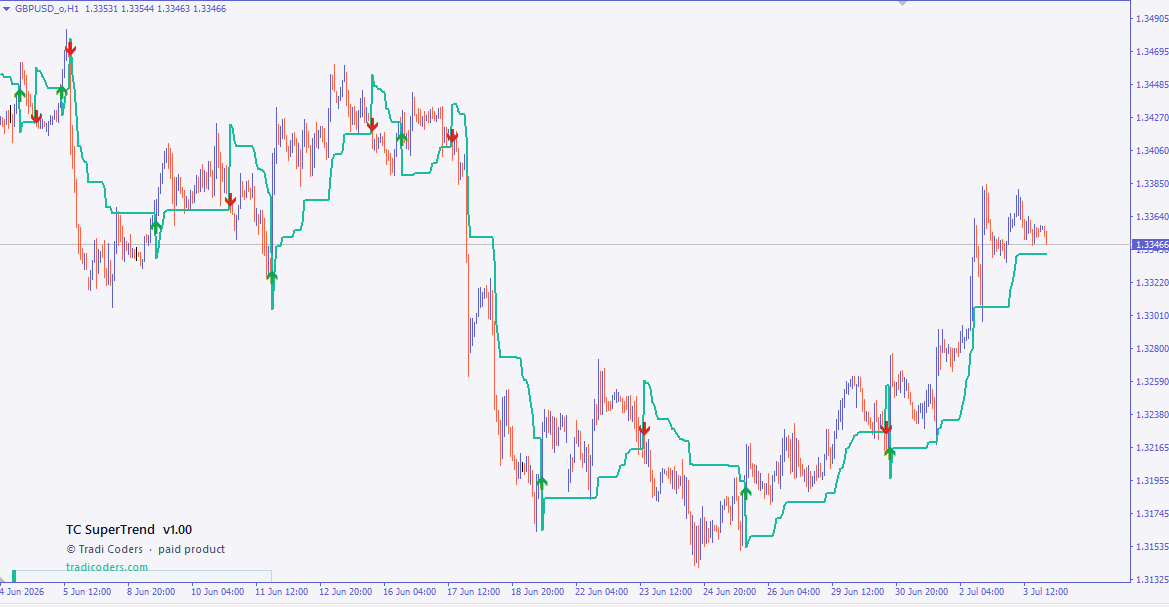
The Super Trend Indicator calculates a dynamic trend line using market volatility. When the price remains above the trend line, the market is considered to be in an uptrend. When the price moves below the trend line, the indicator identifies a downtrend.
As the trend changes, the indicator automatically switches its direction and generates visual trading signals.
Typical behavior:
-
Green Trend Line → Bullish Trend
-
Red Trend Line → Bearish Trend
-
Buy Signal → Trend changes from bearish to bullish
-
Sell Signal → Trend changes from bullish to bearish
These signals help traders identify possible entry and exit points while reducing emotional decision-making.
Main Features
-
Detects bullish and bearish market trends
-
Generates automatic Buy and Sell signals
-
Filters market noise using volatility
-
Suitable for all financial markets
-
Works on all chart timeframes
-
Easy to understand and beginner friendly
-
Compatible with Expert Advisors (EA)
-
Low chart clutter with clear visual signals
-
Fully customizable input parameters
Indicator Buffers
This implementation provides dedicated buffers that can be accessed by Expert Advisors or custom indicators.
ExtST[]
The main Super Trend buffer.
This buffer stores the calculated Super Trend values and draws the dynamic trend line directly on the chart. It represents the current support or resistance level based on market volatility and changes direction whenever the market trend reverses.
ExtBuy[]
The Buy Signal buffer.
This buffer stores the location of bullish trading signals. Whenever the indicator detects a transition from a bearish trend to a bullish trend, a Buy signal is generated and written into this buffer.
Expert Advisors can easily read this buffer to automate Buy entries.
ExtSell[]
The Sell Signal buffer.
This buffer stores bearish trading signals. When the indicator detects a change from an upward trend to a downward trend, a Sell signal is generated and stored in this buffer.
This makes automated Sell entries simple for Expert Advisors and trading systems.
Trading Strategy
Many traders use the Super Trend Indicator as part of a complete trading strategy.
A common approach is:
-
Enter a Buy trade when a Buy signal appears and the trend line turns bullish.
-
Enter a Sell trade when a Sell signal appears and the trend line turns bearish.
-
Use the Super Trend line as a dynamic stop-loss level.
-
Combine the indicator with RSI, MACD, Moving Averages, or Volume indicators for additional confirmation.
Although the Super Trend Indicator is highly effective in trending markets, combining it with proper risk management and confirmation indicators can significantly improve trading performance.
Benefits
-
Clearly identifies market direction
-
Helps avoid trading against the trend
-
Reduces false trading decisions
-
Excellent for trend-following strategies
-
Easy integration into automated trading systems
-
Suitable for manual and algorithmic traders
-
Lightweight and efficient
-
Professional visual appearance
No screenshots available for this product.
No comments yet. Be the first to share your feedback.
Leave a Comment
Related Products
More Indicator tools you may like.

Session Scanner
MA Crossover
MACD Crossover
RSI Divergence